
Your customers are constantly generating signals about how their deployment is going. Whether they're upgrading on schedule, falling behind, or going silent, the Replicated platform is capturing structured data about every customer's journey. The question is whether you've wired things up to listen.
Most vendors set up Replicated, ship their app, and check the Vendor Portal when something comes up. That works early on. But as your customer base grows, manual spot checks don't scale, and the signals that matter most are easy to miss. A customer who stops upgrading isn't filing a support ticket about it. An instance that's been degraded for two weeks might not generate a complaint. These are the signals that tell you how a customer is really doing, and the Replicated platform is already capturing them.
This post is a guide to what's worth paying attention to after the initial sale, how to act on it, and how to wire it into the systems your team already uses.
Behavioral signals vs. proxy signals
Before diving in, it's worth drawing a distinction. Most vendors already have some level of customer awareness through their CRM and marketing automation. Email opens, page views, form submissions. These are proxy signals. They tell you a prospect did something adjacent to your product, but not whether they're actually using it. And for most vendors, even those proxy signals disappear after the deal closes. Marketing automation tracks the funnel, but once someone becomes a paying customer, the CRM goes quiet. The behavioral layer fills that gap.
Replicated helps you capture key behavioral signals. Instance creation, application status, version upgrades, check-in frequency, and custom product metrics you define. These come from the running software itself, not from marketing touchpoints. When an instance reports Ready, that's not an email open. That's confirmed operationally running software.
The combination is where things get powerful. But if you're only wiring up the proxy layer and ignoring the behavioral layer, you're missing the most reliable indicators of customer health.
Three layers of awareness
Not every signal needs the same treatment. Throughout this post, you'll see signals organized into three layers:
- Just-in-time signals are event notifications pushed to you in real time via webhooks, Slack, or email. Use these when action is needed within hours.
- Periodic snapshots are data exports pulled into your systems on a schedule. Use these for trend analysis, QBR prep, and dashboard building.
- Trend detection is patterns that emerge over time from instance insights and custom metrics. Use these to spot trajectory changes before they become problems.
Part of the value here is knowing which layer fits which signal. Not everything needs a Slack alert, and not everything can wait for a monthly export.
A note on air gap deployments. If some or all of your customers run in air-gapped environments, the same signals apply, but the cadence changes. The Replicated SDK collects the same telemetry in air gap mode (version, status, custom metrics), but that data only reaches the Vendor Portal when a support bundle is collected and uploaded. For online instances, you get updates every four hours automatically. For air gap instances, you get updates when bundles come in. This means the just-in-time layer effectively becomes a delayed layer for air gap customers, and establishing a regular bundle collection cadence is important for maintaining visibility. We'll call out specific air gap considerations as they come up throughout the post.
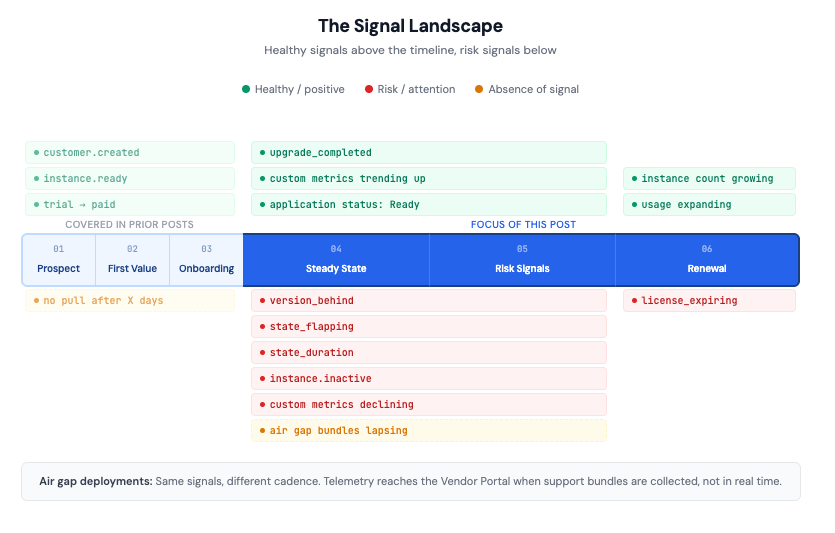
The early lifecycle (stages 1-3)
We've covered the early stages of the customer lifecycle in depth elsewhere, so here's the quick version. If you're just getting started with lifecycle tracking, these are the foundational signals to wire up first.
A few things worth highlighting from the early stages that carry forward:
The custom_id field is your CRM join key. Every Replicated customer record has a custom_id field designed for linking back to external systems. Stamp your Salesforce Opportunity ID, HubSpot deal ID, or whatever CRM identifier you use on the Replicated customer at creation time. Every subsequent signal, whether it's an event notification, a data export row, or an instance insight, can then be joined back to the right CRM record automatically. Set this up from day one. Without it, you're manually matching customer names in spreadsheets at renewal time.
instance.ready is your real "first value" signal. A software pull means they downloaded it. An instance created means they started installing. Instance ready means it's actually working. These are three very different levels of commitment, and most vendors only track the first one.
The integration goes both directions. Event notifications push signals from Replicated into your CRM. But the vendor API also lets you automate customer creation in Replicated when a deal closes in Salesforce. The reference implementation shows the full contract-to-customer-creation flow. You don't need to map every field on day one. Start with name, email, channel, license type, and expiration.
The rest of this post focuses on what happens after the deal closes, which is where most vendors go dark signal-wise.
Stage 4: Steady state, healthy customer
No news is good news. But data is better.
The deal closed, the instance is running, and attention shifts to the next prospect. This is exactly when you should be building the data foundation for renewals and expansion. The signals are there. Most vendors just aren't collecting them yet.
What to watch
Version currency. How many release versions behind is each customer? The instance.version_behind signal tells you this directly. Set up a notification to alert your CS team when any paid customer falls 3 or more versions behind on their channel. This is a leading indicator, not a trailing one. Customers who fall behind on upgrades tend to stay behind, and the further behind they get, the harder it is to catch up.
Upgrade completions. instance.upgrade_completed confirms a customer has successfully moved to a new version. Track these over time and you'll see each customer's upgrade cadence. Some customers upgrade within days of a new release. Others take months. Both patterns are fine, as long as they're consistent. It's when the pattern changes that you should pay attention.
Custom metrics. This is where the picture gets specific to your product. Replicated automatically tracks infrastructure signals: version, application status, cluster info, check-in frequency. But only you know what "healthy usage" looks like for your application. Active users, jobs processed, data volume, integrations configured, features adopted. These are the metrics that tell you whether a customer is getting value, and you report them through the custom metrics API, as well as the ability to set up custom event notifications on these metrics.
Your application sends metric values to the SDK's in-cluster endpoint (http://replicated:3000/api/v1/app/custom-metrics), and they flow into the same instance insights timeline as the infrastructure data. They show up in the Vendor Portal with time-series graphs, and they're exportable via the data export API alongside everything else. You don't need to instrument everything at once. Pick two or three metrics that best represent "this customer is healthy" and start there.
Application status. The SDK automatically reports whether your application is Ready, Updating, Degraded, or Unavailable based on the health of the underlying Kubernetes resources. A customer whose instance spends most of its time in Ready status is in good shape. One that's frequently Degraded might need attention even if they haven't filed a support ticket.
How to act on it
Build a periodic health snapshot. Set up a weekly or monthly data export into your warehouse or CRM. The instance data export API returns customer and instance data in CSV or JSON, including current version, instance status, custom metrics, and license expiration. This becomes your renewal prep data and your QBR material. Because you stamped custom_id back in Stage 3, every row in the export can be joined to the right CRM record without manual matching.
For air gap customers, establish a regular bundle collection cadence. All of the signals above (version currency, upgrade completions, custom metrics, application status) are collected by the SDK in air gap environments, but they only reach the Vendor Portal when a support bundle is created and uploaded. Frame this with your customers as a routine product maintenance check-in, not an escalation. A monthly or quarterly cadence gives you a reliable data collection opportunity and keeps the instance from going dark in your reporting. Bundles can be uploaded by the vendor through the Vendor Portal or by the end customer through Enterprise Portal, whichever fits the relationship better.
Layer emphasis: All three layers matter here. Just-in-time for version-behind alerts. Periodic snapshots for the health export. Trend detection for custom metrics trajectory. But trend detection is the most important one because you're watching for trajectory changes, not individual events.
Stage 5: Risk signals
Something changed.
The most valuable risk signals aren't dramatic failures. They're subtle shifts in behavior that, if you catch them early enough, give you time to intervene before a renewal conversation turns into a churn conversation.
Infrastructure signals
instance.version_behind fires when a customer falls behind by a configurable number of versions. This is your first-line version currency alert. Route it to CS, not to an engineering on-call rotation. The right response is a conversation ("we noticed you haven't upgraded in a while, can we help?"), not an incident.
instance.state_duration fires when an instance has been in a given state (typically Degraded or Unavailable) for longer than a threshold you configure. A customer whose instance has been degraded for two weeks might not know it, or might have given up trying to fix it. Either way, proactive outreach beats waiting for a support ticket.
instance.state_flapping fires when an instance is oscillating between Ready and Degraded. This is one of the most underused signals available. A flapping instance often means environmental instability or a misconfiguration that hasn't fully broken things yet. The customer might be experiencing intermittent issues they haven't reported because each individual occurrence resolves itself. Left unaddressed, flapping tends to escalate. Route this to your support or SRE team.
instance.inactive fires when an online instance stops checking in. The SDK reports every four hours. If check-ins stop, something is meaningfully wrong. The instance may have been removed, the cluster may be down, or the customer may have moved on without telling you. (This signal applies to online instances only. Air gap instances don't check in automatically, so inactivity is expected and managed through the bundle collection cadence described in Stage 4.)
Behavioral signals
These don't come from a single event notification. They emerge from the data over time.
Upgrade velocity slowing. A customer who used to upgrade within a week of a new release and now takes three months is telling you something. Maybe they've lost the engineer who handled upgrades. Maybe the upgrade process has gotten too complex. Maybe they're deprioritizing your product. The data export API gives you the timeline to spot this, and it's worth reviewing quarterly for your key accounts.
Custom metrics declining. Fewer active users month over month, reduced data volume, features going unused. If you've instrumented custom metrics (and you should), a downward trend is the clearest leading indicator of churn risk. No single data point is conclusive, but three months of declining usage tells a clear story.
Air gap bundle collection lapsing. If you've established a regular bundle collection cadence with an air gap customer (as recommended in Stage 4) and that cadence breaks, you've lost more than a support workflow. You've lost your entire telemetry window. Version currency, application status, custom metrics, all of it goes dark until the next bundle comes in. A lapsed collection schedule for an air gap customer is itself a risk signal, either the relationship has cooled, the customer's team has changed, or something about the collection process has broken down. Follow up on it the same way you'd follow up on any other behavioral change.
How to act on it
The infrastructure signals should be wired up as just-in-time notifications. state_flapping and state_duration go to your support team via Slack. instance.inactive goes to CS. version_behind goes to CS via email (it's not urgent enough for Slack noise, but it needs to be tracked).
The behavioral signals require periodic review. Pull the data export quarterly for your top accounts and look at upgrade velocity, custom metrics trends, and engagement patterns. No single signal means churn is imminent, but three or four of them together paint a clear picture. If you have the data warehouse infrastructure, build a composite risk view that combines version currency, custom metrics trajectory, and check-in recency into a single dashboard.
Stage 6: Renewal and expansion
Prove the value. Spot the opportunity.
Renewals shouldn't be a surprise, and the data to prepare for them is already being captured if you've followed the earlier stages.
What to watch
customer.license_expiring fires at a configurable lead time before a license expires. This should trigger a renewal workflow in your CRM, not just an email to the account manager. Include the customer's health data in the CRM record so the renewal conversation is grounded in specifics, not guesswork.
Instance count growing. A customer deploying to more environments is a natural expansion signal. If they started with one production instance and now have three across different regions, that's a conversation about whether their license terms still match their usage.
Custom metrics showing expanded usage. More active users, higher data volumes, new features being adopted. These are upsell triggers. Route them to your sales team as expansion opportunities with data attached, not as generic "customer is doing well" updates.
How to act on it
Build a renewal prep package. Pull the data export for the customer. Because you set custom_id at creation time, your renewal team can pull up the full CRM context alongside the Replicated usage data without manually matching records. Assemble a usage summary: current version, upgrade history, instance health, custom metrics trends, time on platform. The renewal conversation shifts from "ready to renew?" to "here's the value you've gotten this year, and here's where you could get more."
Layer emphasis: Periodic. Renewal is a planned event, not a surprise. The data should be assembled ahead of time, not scrambled together the week before the contract expires.

Putting it all together: push vs. pull
Here's the practical framework for deciding how to wire things up.
Push (event notifications) when:
- Action is needed within hours (instance down, trial stalling, license expiring within 7 days)
- The event is low-volume and high-signal (customer.created, instance.ready, state_flapping)
- You want to route to a specific team in real time (support, CS, sales)
Pull (data exports) when:
- You need context over time, not a single event (version currency trends, adoption curves)
- You're preparing for a scheduled activity (QBR, renewal, board report)
- You want to build composite scores or dashboards (customer health, portfolio risk)
Both when:
- The signal has an immediate action and a long-term trend component. Upgrades are the best example: alert when a customer falls 3+ versions behind, but also track upgrade velocity over time to spot gradual slowdowns.
For vendors with air gap customers, the push layer is naturally limited for those instances since telemetry arrives on the bundle collection schedule rather than in real time. The pull layer becomes even more important: make sure your periodic data exports capture the latest bundle data, and use the regular collection cadence as your de facto check-in rhythm for those accounts.
The CRM as the connective tissue
For most vendors, the CRM is where customer context lives. The pattern that ties this whole post together is straightforward:
- Use custom_id to link Replicated customers to CRM records at creation time
- Push real-time signals into Slack or your CRM via event notification webhooks
- Pull periodic data exports into your warehouse for trend analysis and reporting via the data export API
- Instrument your application with custom metrics so the behavioral layer is as rich as the infrastructure layer
These are the integration surfaces. The Salesforce reference implementation shows what the CRM-to-Replicated direction looks like. The event notification webhooks handle the Replicated-to-CRM direction.
Start here
If you do nothing else, do these three things:
- Set up three notifications: customer.created to Slack, instance.ready to Slack, instance.version_behind (threshold: 3) to email for your CS team
- Stamp custom_id on every new customer with your CRM record ID
- Run one weekly data export into your CRM or warehouse
If you have air gap customers, add a fourth: establish a regular bundle collection cadence with each of them, framed as a routine product health check-in. That collection schedule is what keeps those customers visible in everything above.
You'll have more customer awareness than most vendors within an afternoon. Everything else in this post builds on that foundation.