
What’s New At Replicated: Better Visibility, More Control, and Less Manual Work
Operating self-hosted software at scale is becoming more complex.
Customers expect more. Security requirements are higher. And teams are being asked to move faster without adding more people.
As Amber Alston, VP of Product at Replicated, shared in a recent RepliCon talk, the focus is on helping vendors operate at scale while removing as much manual process as possible.
Over the past quarter, Replicated has focused on exactly that. The latest updates are aimed at giving vendors better visibility into what is happening across their customers, more control over how they respond, and more ways to automate the work in between.
TL;DR
Replicated’s latest updates are focused on helping vendors operate at scale with less manual work.
Highlights:
- A new event notification system with advanced filtering, routing, and webhook support
- More precise lifecycle signals, including upgrade completion and customer access events
- Support bundle improvements with metadata enrichment and in-UI inspection
- Expanded Security Center visibility into vulnerabilities
- Enterprise Portal updates for streamlined onboarding
- Quality-of-life improvements across the SDK and CLI
Event Notifications: From Signals to Action
One of the biggest updates this quarter is the new event notification system, now available in beta.
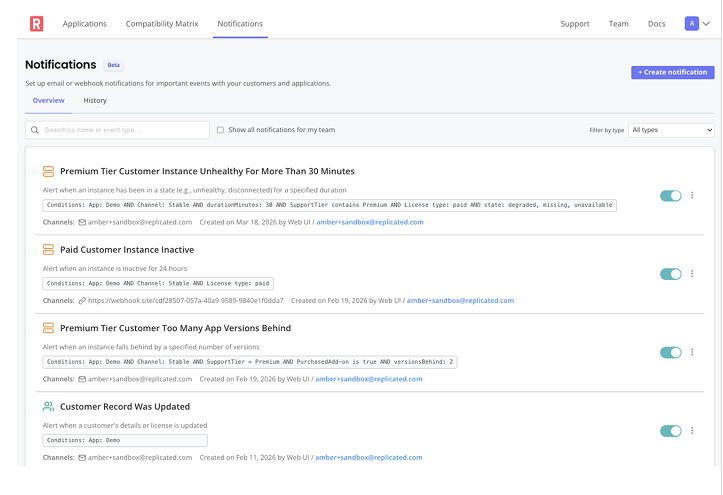
This is a new system for setting up targeted alerts across your customer and application lifecycle. You choose the events you care about, filter them to the right scope, and route them to the right people via email or webhook.
If you’ve used classic instance notifications before, this is the next generation of that system, expanding beyond instance-level signals to cover a broader set of events.
A More Flexible Notification System
It now includes more than 20 event types across the customer lifecycle, application lifecycle, and release lifecycle.
Notifications can be scoped down to a specific application, customer, channel, license type, or even custom license field values.
For example, you can set up a notification that fires only when a paid customer on a stable channel uploads a support bundle and route that directly to a specific Slack channel for your tier one support team.
More Precise Lifecycle Signals
Instead of relying on broad events like an upgrade starting, you can now distinguish between when an upgrade begins and when an instance is actually ready and healthy after that upgrade.
This makes it possible to understand whether an upgrade actually succeeded, rather than just whether it was initiated, which is especially important when triggering follow-up actions or monitoring customer health.
Smarter Alerts and Better Signal Control
Custom metrics alerting has also been expanded.
Instead of only detecting when a value changes, you can now define alerts using operators appropriate to the metric and control when and how often notifications are sent.
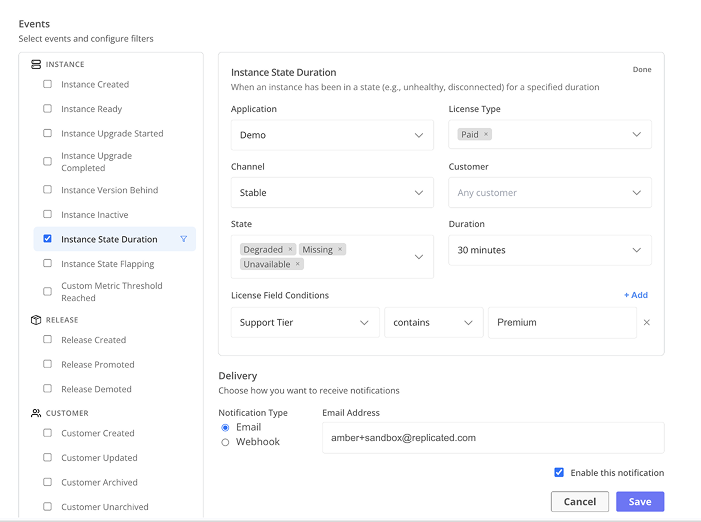
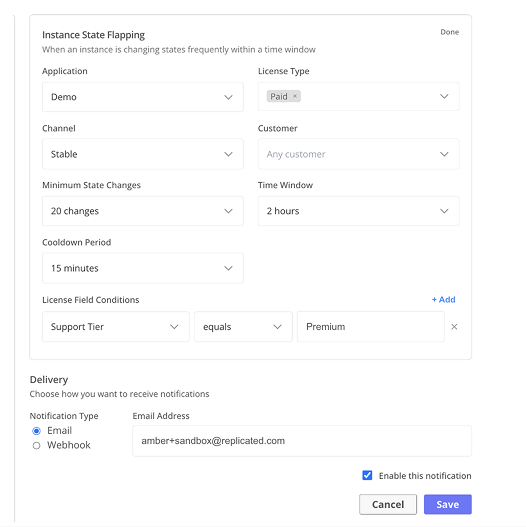
New alerts for instance state duration and flapping behavior make it easier to detect not just unhealthy instances, but unstable ones where status is repeatedly changing.
Instead of treating every state change the same, you can define what actually matters. For example:
- How long does an instance need to remain unhealthy before you are notified?
- How many times does it need to change state before it is considered a problem?
These configurable thresholds, along with built-in cooldown periods, help control noise and ensure alerts reflect real issues rather than transient behavior.
Better Signals Across the Customer Lifecycle
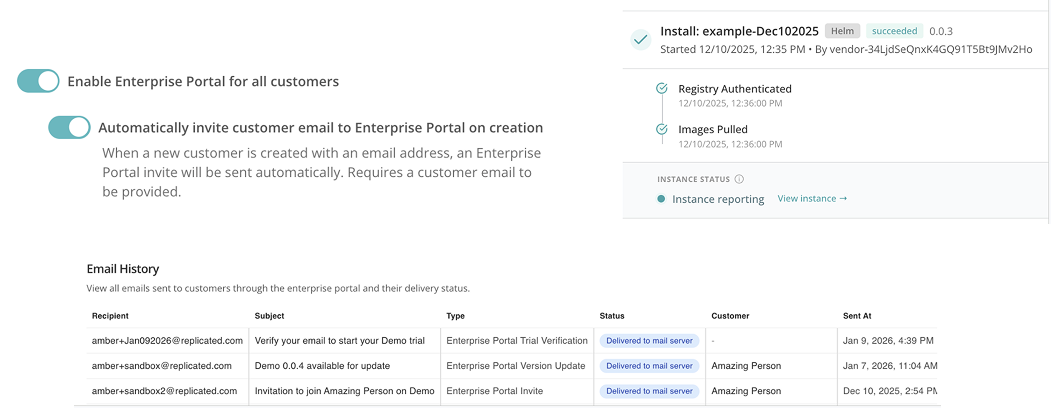
The system also introduces more precise lifecycle signals, including when an instance is ready after an install or upgrade, when an upgrade has completed successfully, and when users are invited to or join the Enterprise Portal. These events are also available as queryable timestamps through the Vendor API.
Amber highlighted one especially important use case: knowing when a customer first had access to the software. For some vendors, that moment is when the Enterprise Portal invite is sent. For others, it is when the user first logs in. Others define it as the first time the software is actually pulled.
Replicated captures all of these moments through subscribable notifications and API-accessible timestamps, making them easier to track consistently across operational workflows.
Knowing when invites are sent and when users join the Enterprise Portal is useful for day-to-day visibility. That first moment of access is also significant from a revenue recognition perspective, particularly for companies following ASC 606, since it represents the point at which a customer actually has access to the software.
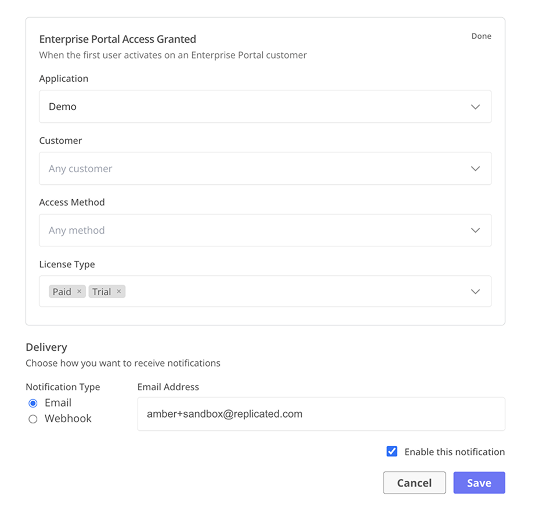
Event notifications are available now in beta and rolling out in the Vendor Portal. Setting up a subscription takes just a few minutes and is a quick way to start seeing how these signals can be routed into your existing workflows.
Support Bundles: More Context, Less Guesswork
Support bundles have been expanded to include metadata enrichment.
Using the Replicated SDK API, your application can attach structured metadata at bundle collection time, including severity, environment, error type, ticket ID, and customer notes.
This uses the same post and patch methods as custom metrics, which means metadata can be added or updated over time rather than needing to be defined all at once.
This metadata is stored and collected at bundle generation time, and can also be passed directly via CLI flags when generating a bundle.
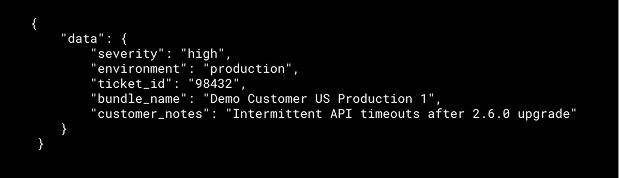
With structured context attached at collection time, support bundles become easier to reason about without needing to reconstruct what happened after the fact.
This is the first phase of a broader effort to make bundles more triageable, searchable, and automatable as part of the overall support process.
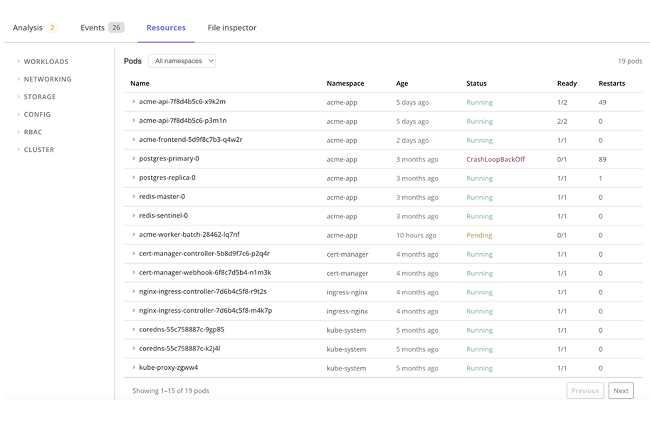
In the Vendor Portal, you can now inspect bundle contents directly, including Kubernetes events, pod status, container logs, resource data, and cluster inventory, without downloading the bundle.
This is designed to serve as a first point of triage. The updated interface surfaces much more information directly in the Vendor Portal, making it possible to quickly scan and begin troubleshooting without immediately downloading the bundle.
When viewing a specific instance and navigating to support bundles, the experience is also now pre-filtered to that instance’s context, rather than showing bundles across all customers.
Automating Support Workflows
Support bundle data can now be more easily integrated into external systems.
This makes it possible to route support bundle events into tools like PagerDuty, create Jira tickets with relevant context, or send enriched alerts to Slack.
It also enables workflows like pulling bundles in bulk to analyze trends across support issues or identify patterns in customer environments.
Security Center: Making Vulnerabilities Easier to Act On
Security Center continues to evolve with improved visibility into vulnerabilities.
Recent updates include real-time image scanning status, the ability to retry failed scans, improved visibility into where vulnerable images are referenced within an application, and access to the full scan output directly in the Vendor Portal.
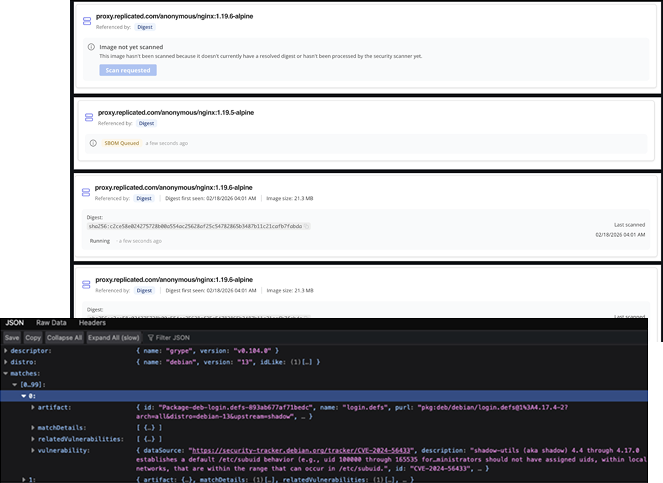
This makes it easier to trace a vulnerability back to the exact part of the application where it is introduced and understand what needs to be addressed.
On the customer side, Enterprise Portal now shows CVE information comparing the version a customer is running with the latest version available to them based on their license and channel.
This makes it clearer which vulnerabilities are resolved by upgrading and helps guide customers toward taking action.
Quality of Life Updates Across the Platform
There are also several smaller improvements across the SDK and CLI.
The Replicated SDK now supports high availability configurations, including multiple replicas, pod anti-affinity, and pod disruption budgets, which is especially important for applications that depend on the SDK for license validation or security reporting.
On the CLI side, you can now delete channels and test customers more easily via the Vendor API, which simplifies cleanup in CI-based workflows. Release creation and promotion can also now be combined into a single step when marking required versions.
These are the kinds of changes that show up in day-to-day workflows, particularly for teams managing large numbers of customers or running automated release pipelines.
Better Visibility, More Control, and Less Manual Work
Across these updates, a consistent pattern emerges.
Replicated is focused on providing better visibility into customer and application activity, giving vendors more control over how they respond, and making it easier to integrate with the systems they already use.
The result is a platform that aligns more closely with how teams actually operate at scale, where automation, integration, and reduced manual overhead are essential.